



I’m not writing this to make anyone feel bad about vibe coding. I did it too, early on, back when Codex was spitting out screens for me in minutes and I was genuinely delighted by how fast a prototype could come together. If you’ve been building something by describing what you want and letting the AI hand it to you, you haven’t done anything wrong. You’ve done the first half of the job.
The second half doesn’t require a computer science degree. It doesn’t require a six months of grinding through a textbook nobody finishes. It requires one habit: when the AI does something you don’t understand, you ask it why, instead of shrugging and moving on because the app still loaded.
That one habit is the entire difference between a vibe coder and what a good number of software engineers are now calling agentic development. And you can thank Andrew Ng for that one. Not someone who writes every line by hand. Someone who’s still driving the thing, even while an agent does the typing. Although I’d say a new kind of bootcamp would help, this habit matters more on top of any class you could take.
The Genie Trap

When you’re new to this, the AI feels like a genie. You describe what you want. It appears. Ask for a login screen, get a login screen. Ask for a lineup card, get a lineup card. For a while, this works so well that it feels like the whole “learn to code” thing was a scam nobody needed to run on you.
Here’s the trap, and it’s not the one you’d expect. A genie doesn’t just grant your wish. It grants exactly what you said, which is not always exactly what you meant. And when you only have one wish in the air at a time, the gap between those two things rarely shows up. It’s fine. It works. You ship it and move on to the next wish.
The trouble starts when you’ve made fifty wishes and they’re all sitting in the same codebase together, and some of them, without you ever noticing, have started fighting each other.

That’s not a metaphor for something abstract. That’s the actual mechanism. Every feature you vibe your way into is a wish granted against a codebase that already has forty other wishes baked into it, and the genie doesn’t check whether wish fifty-one quietly breaks the promise made by wish twelve. It just grants what you asked for. This is real engineering happening under a friendlier name. The people who call it “just vibes” are the ones who haven’t hit the moment yet where two of their wishes collide, because they haven’t built anything big enough for that to happen. Give it time. It happens to everybody. It happened to me plenty of times building BenchBoard, and I’ve been writing code since Netscape was around. Yep, the time when you could build tables on web pages for the first time. Anyway…
The Commit You Can't Actually Revert
(Two quick terms, for anyone who hasn't heard them. A modal is a focused ‘popup’ window that takes over the screen for one task, like editing a lineup, while the page behind it waits. Think "Are you sure you want to delete this?" or a login box that appears on top of whatever you were looking at. A commit is a saved checkpoint of your code, tracked by something called version control, usually a tool called Git, so you have a running history of exactly what changed and when, and can always go back and look. Think of your favorite PC game you clicked ‘save’ on before you’re about to something stupid like jump into a cave with higher level monsters)
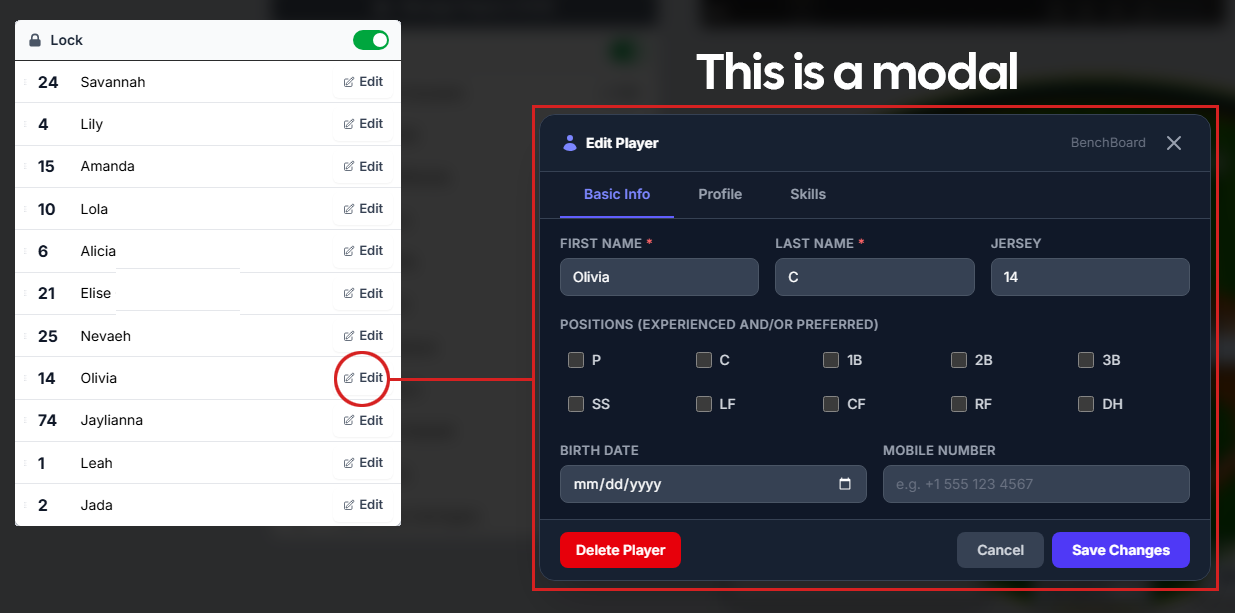
Here’s the thing nobody tells you about version control when you’re starting out: yes, you can always roll back to a previous commit. No, that does not mean you’re safe.
A few months into BenchBoard, I vibe coded a quick modal for editing a lineup mid-game. Fast, simple, solved the problem in front of me that day. A few weeks after that, working on something totally unrelated, I needed a similar modal for editing a lineup before the game even started, in practice mode. Rather than reuse the first one, the AI, moving fast and following the path of least resistance, built a second modal that did almost the same thing with a slightly different name. Close enough that I didn’t catch it in review. I had a working feature. I moved on.
That decision sat there quietly for three months. Nothing about it was broken. Nothing crashed. It just sat in the codebase, doing its job, while I built more features on top of and around it without ever going back to clean it up.
Then I asked for a small change: “update the lineup modal so it shows jersey numbers next to names.” One sentence. Should’ve been trivial. Instead the AI updated the wrong modal, the practice mode one, because by that point there were two modals with overlapping names doing almost the same thing, and nothing in the codebase made it obvious which one I meant. I didn’t catch it right away either, because the change looked fine in the mode I happened to test. It shipped. A week later a coach messaged me confused because jersey numbers were showing up in practice mode but not during a live game, the exact opposite of what I’d asked for.
Here’s the part that should scare you a little. Reverting to a previous commit does nothing for this. The bug wasn’t introduced the day it shipped. It was introduced three months earlier, the moment two modals that should’ve been one modal came into existence, and every commit since then built on top of that decision as if it were solid ground. There’s no clean commit to roll back to, because every single commit from that point forward is “correct” in the sense that it does what it was asked to do. The rot isn’t in any one commit. It’s in the shape of the thing, and that shape doesn’t show up in a diff.
You find bugs like this two ways. Either the site slows to a crawl because you’ve got redundant logic running in parallel and nobody ever noticed because each individual feature worked fine in isolation, or the AI itself gets confused about which piece of near-identical code you’re actually pointing at, and quietly edits the wrong one while sounding completely confident that it got it right.
That’s the moment that separates a vibe coder from someone building real engineering judgment. Not because you should’ve caught it in advance. Almost nobody does, the first time. But because when it happens, do you shrug and patch the symptom, or do you stop and ask why there were two modals in the first place? Asking that question, out loud, to the AI, and actually reading the answer, gets you at least in the same classroom as the traditional OG software engineers that came before you.
Write the Class, Not the Description

Sometimes asking a better question still isn’t enough. Sometimes the fix is to stop describing what you want in English at all and just write the actual code.
Here's a real one, from today. BenchBoard has a feature for pitcher rest rules, the mandatory days off a kid pitcher needs after throwing a certain number of pitches or innings, because overusing a young arm is a real injury risk and most youth leagues have actual rules about it. That data was sitting inside a generic JSON blob, which is just a loose, catch-all chunk of text that stores a bunch of different values together without any real structure enforcing what belongs there. Here's roughly what it looked like, buried inside a much bigger settings object shared by a dozen other unrelated features:
Before (What the LLM wanted)
"rules": {
  "pitchCountRestDays": {
    "0-20": 0,
    "21-35": 1,
    "36-50": 2,
    "51-65": 3,
    "66+": 4
  },
  "inningRestDays": {
    "7+": 1
  },
  "softballOnly": false
}
Nothing here stops a typo. Nothing stops someone from adding a "67-80" tier that overlaps "66+." Nothing enforces that the day counts actually climb in order. It's just text that happens to look like data, sitting inside a bigger blob of text that happens to look like settings. I wanted it moved into its own proper table instead, which you can picture like a spreadsheet: the table is the whole sheet, a row is one team's entry, and a column is one specific field, like a threshold number, that every row has a slot for. Reasonable ask. Vague enough to cause trouble.
The AI ran with it and, watching it think out loud, talked itself into three different answers in a row. First it proposed a parent table plus a child row for each rest tier, the textbook relational approach, meaning each tier would live as its own separate entry linked back to the team instead of sitting in the same row. Then it caught a real flaw in its own idea: a child-row design can't actually guarantee the tiers ascend in order with no gaps between them, because that's a rule that spans multiple rows, and nothing at the database level enforces a relationship across rows like that without a trigger, which is a small extra program the database itself runs automatically whenever something changes, one more moving part to build and maintain. So it reversed itself into an array column instead, a single slot meant to hold a whole list of values at once. Then it caught the problem with that idea too: SQL Server, the database BenchBoard runs on, has no real array type, so an "array column" is really just a comma-separated string or another JSON blob, the exact thing I was trying to get away from in the first place. It landed, eventually, on a third design, four fixed columns in one row, which was actually the right call. But that's three confident, fully-reasoned answers to a question that never should have needed three.
So instead of writing a better paragraph, I wrote the class, meaning the actual code definition of what one row in this new table looks like. Not a description of a table with some thresholds in it. The real thing:
public class RestRule
{
    [Key]
    public Guid RestRuleId { get; set; }

    public Guid TeamId { get; set; }

    /// <summary> Update REST_TABLE_KEY</summary>
    [MaxLength(10)]
    public string Unit { get; set; } = string.Empty;

    /// <summary>Workload at which the Nth rest day starts being owed. int is PITCH COUNT ONLY</summary>
    public int? Day1Threshold { get; set; }
    public int? Day2Threshold { get; set; }
    public int? Day3Threshold { get; set; }
    public int? Day4Threshold { get; set; }

    /// <summary>
    /// Applies to SOFTBALL ONLY. In organized fastpitch softball, the maximum
    /// mandatory rest requirement specified by official league rules is 1 calendar
    /// day of rest, which is required only if a pitcher appears in 7 or more innings
    /// in a single day (found in youth organizations like Little League Softball).
    /// For most adult, collegiate (NCAA), professional, and international (WBSC)
    /// fastpitch leagues, there are no mandatory days of rest required by rule. So
    /// the entity below mostly covers youth levels.
    ///
    /// One column, not four: the ceiling really is one day, so there is no second
    /// tier to represent. Do not add Day2InningThreshold "for symmetry" — it would
    /// be a field no rulebook can fill.
    /// </summary>
    public int? Day1InningThreshold { get; set; }

    /// <summary>Who last changed a safety number, and when. Not decoration.</summary>
    public int? UpdatedByUserId { get; set; }
    public DateTime CreatedAt { get; set; }
    public DateTime UpdatedAt { get; set; }

    public bool IsDeleted { get; set; }
}
Look at the difference. Every field has a name, a type, and a comment explaining exactly what it means and why it exists, including the comment that stops a future version of me, or a future version of the AI, from “helpfully” adding a second inning tier that no rulebook actually supports. That single sentence, “it would be a field no rulebook can fill,” is doing work the JSON blob above could never do. A comment like that can’t happen in a loose bag of key-value text. It only exists because the structure exists to hang it on. RestRuleId as a Guid, which is just a long, random, unique ID the system generates so no two records ever get mixed up with each other. TeamId as a Guid too. A short string field called Unit. Four nullable integer columns named Day1Threshold through Day4Threshold, each one commented directly in the code: pitch count only. And one more field, a single inning threshold, with a comment that nailed down a piece of domain knowledge no AI could ever just know on its own, that Little League Softball requires exactly one calendar day of rest, and only after a pitcher throws seven or more innings in a day, and that most higher levels of softball don’t mandate any rest at all. That comment matters more than almost anything else in the file, because it’s the actual rule, sitting where it can’t get flattened into a summary later.
Along with the class, I gave one plain sentence of context the AI didn’t have: leave the existing settings data alone, just read the flag that’s already there, it’s already scoped by team, there’s nothing to migrate.
One message. Not a better prompt. The actual code, plus one sentence.
And here’s the part worth paying attention to, because the ambiguity didn’t disappear. The AI immediately came back with a real, specific question: did I mean one row per team, with a single field silently picking which set of columns mattered, or one row per team and per sport? That’s a legitimate design question, and it deserved an answer. But notice what changed. Before, the AI was arguing with itself across three entirely different architectures, and I had to read all three and pick a winner. After I wrote the class, there was exactly one question left, specific enough to answer in a sentence.
A vague prompt gets you options. A written class gets you one exact remaining question. That’s the difference between refereeing an argument and ending one.
The AI Will Sound Right Even When It Isn't
This is the sharper version of the same problem, and it’s why asking questions matters even when nothing looks broken yet.
I asked for help tracking a baseball stat called Range Factor, which depends on knowing whether a particular defensive play was even possible given who was on base.
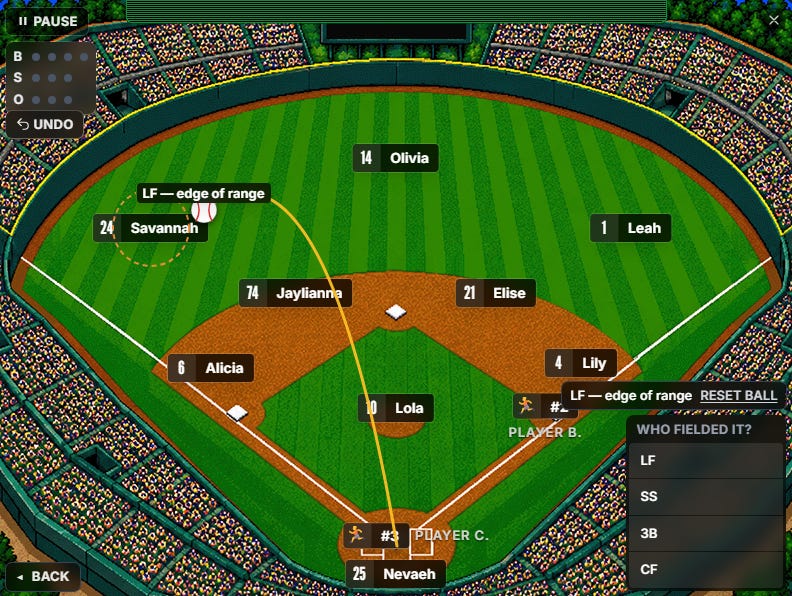
The AI walked me through the rule correctly. Explained it back to me in plain English, got every part of the logic right in the explanation. Then it wrote a function that checked something adjacent to the rule instead of the rule itself. A shortcut that happened to give the right answer in most situations and the wrong answer in exactly the high-stakes situations where it mattered most.
If I’d only read the English explanation, I would have shipped that bug, because the explanation was correct and the code wasn’t. I only caught it because I asked a follow-up question I already half knew the answer to, the kind of question that feels almost too basic to bother asking. That’s the habit. Not writing better prompts. Asking the dumb-sounding follow-up question anyway, especially when the AI sounds confident, because confidence and correctness are two completely different signals and only one of them is visible on the screen.
"It Works" Is Doing a Lot of Heavy Lifting

Say those two words out loud. “It works.” Now ask yourself: works when? Works for who?
An app can work perfectly when one person is testing it alone on their laptop and fall apart the second two people touch it at the same moment. I watched this happen on my own scoreboard. A coach drags a player to a new position on the field. Looks fine. Instantly, in the background, two different parts of the system both try to save that change to the same record at the same time, and whichever one finishes last wins, silently overwriting whatever the other one just did correctly.
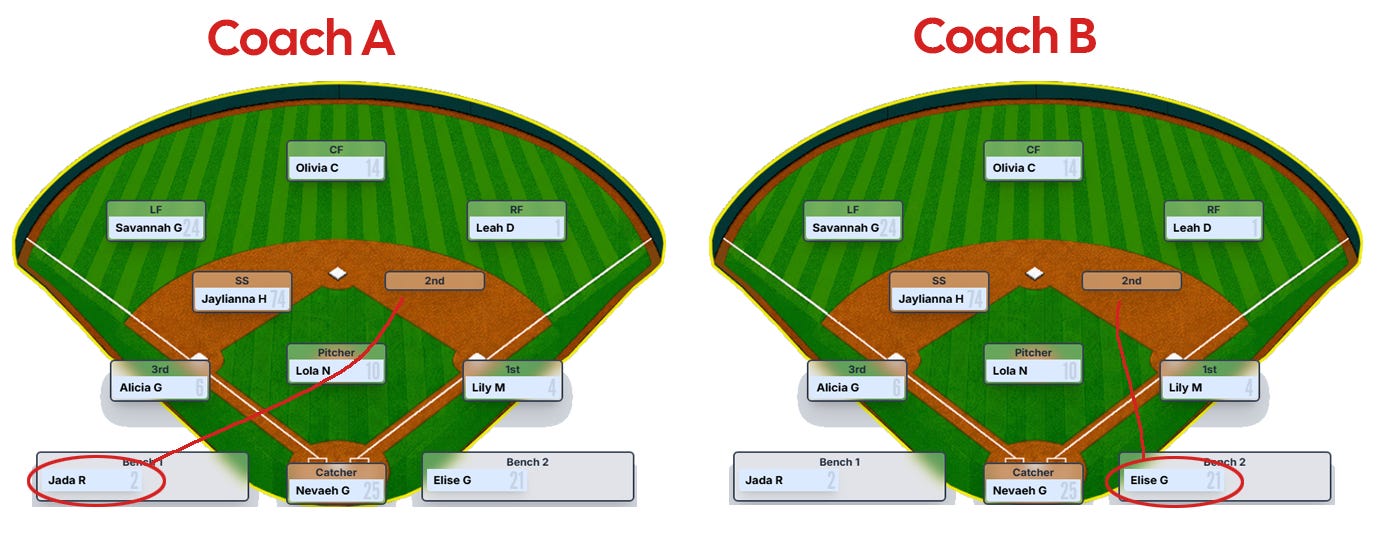
I opened the app later that night and found two players standing as defenders for second base. Not a crash. Not an error message. Just two players occupying the same spot on a field where that’s supposed to be physically impossible.
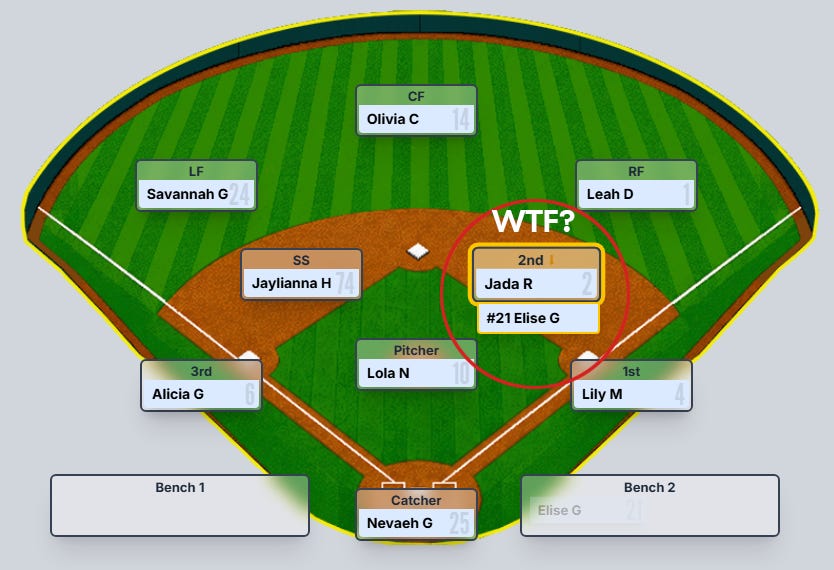
That bug will never show up in a demo. Demos have one person clicking one button at a time. It only shows up in the real world, when a real coach on a real field is making a real change at the exact moment somebody else’s screen is also updating.
And here’s the part worth sitting with. The best model in the world, running on unlimited compute with unlimited tokens and no cost constraints at all, would not have caught that bug either. Not because it isn’t smart enough. Because it doesn’t know your intentions. It has never stood on a field. It doesn’t know that a real coach, mid-game, drags a player to a new position while a parent’s phone is simultaneously pulling the live scoreboard, because nobody told it that’s how the product actually gets used. No amount of horsepower fixes a gap in intention. That’s not a scaling problem. It’s a completely different kind of problem, and scale doesn’t touch it.
This is also the difference between building a bike and building an F1 car. A bike forgives you. Put the chain on slightly wrong, ride it anyway, nothing catastrophic happens. An F1 car does not forgive you. Every system talks to every other system, tolerances are measured in fractions, and a mistake that would be invisible on a bike shows up as a car in a wall at two hundred miles an hour. Software works the same way once it grows past a toy. BenchBoard isn’t a 747, nobody’s life is on the line the way it would be in aerospace software, but it’s closer to the F1 car than the bike the moment real coaches on real fields depend on it during a real game. You cannot assume the engine knows what you meant. You have to tell it, or ask enough questions to find out where you failed to.
This is exactly why it drives me up a wall watching some YouTuber pull up a single prompt, get a working boilerplate app in ninety seconds, and act like that proves anything about how good a model is. It doesn’t. A demo with one user clicking one button proves the bike rolls forward in a straight line on a flat driveway. It says nothing about what happens when two people grab the handlebars at once. Even the best model in the world still needs a solid engineer in the loop who knows what they’re actually building, because the model was never going to supply the intention on its own. It can’t. That’s not what it is.
So how do you know you’ve actually graduated out of vibe coding? Not when your app stops breaking. Things will always break. You’ll know when the question you reach for changes. “Why isn’t this working?” is a vibe coder’s question. It hands the whole problem back to the AI and hopes it guesses right on the retry. “Tell me the exact steps and flow when you’re saving this player’s name” is a completely different question. It forces you both to look at the actual mechanism instead of the symptom, and it’s the kind of question that would have caught the right field bug before it ever shipped, because it makes the two competing writers visible instead of letting them stay invisible until a coach finds two players standing in the same spot on the field. That distinction, between asking about the symptom and asking about the mechanism, is worth its own article. For now, just notice which one you reach for first.
What Asking Should Look Like

While being in a classroom and having whole new approach to doing this stuff would help immensely, you also don’t need to write code to ask a good question.
But you do need to get past the thing that makes this genuinely hard: a bad answer and a good answer sound identical coming out of the model.
1. Fluency doesn’t track correctness.
Not with Claude, not with any of them. The confident tone is generated the same way whether the underlying reasoning is solid or completely wrong, so “that sounds right” is not information. It never was. It just feels like information because we spent our whole lives around humans, where hesitation and confidence were at least loosely correlated with knowing what you’re talking about.
So if fluency isn’t the signal, what is? A few things I actually watch for.
2. Make it trace its own steps out loud instead of asking it to just fix something.
Have it write out every move it’s making, in order, down to a console log line for each step if that’s what it takes. Think of an engine mechanic who just says “sounds fine” versus one who hooks up a diagnostic and actually watches cylinder one, two, three, and four fire in sequence. The moment the AI writes out that it’s firing steps one, two, three, four in that order, and the actual output comes back one, two, four, three, you don’t need it to tell you something’s wrong. You already see it. Half the time, that alone is enough for the model to catch its own mistake, because writing the sequence down forces it to check the sequence, not just describe it.
3. Write out the actual data flow yourself
Screen by screen. When a coach saves a player’s name, what actually happens next? Does it save to the device first? Does it write to the database, the central place where the app permanently stores information so it’s still there the next time anyone opens it? Does it broadcast out to every other screen watching that same game in real time? I found out the hard way that this last one mattered more than I expected. Early in the beta, I changed a player’s name on my screen, it updated fine on my side, and none of the other coaches watching that game saw it change at all. The fix needed SignalR, which is the piece of technology that keeps every connected screen talking to a live server so a change pushes out to everyone instantly instead of everyone needing to refresh and hope. Without it, every coach is staring at whatever snapshot loaded whenever they last opened the page, and nobody knows it. You don’t find that gap by asking “why isn’t this syncing?” You find it by forcing yourself to trace the actual path one piece of data takes from your screen to everyone else’s.
4. Bet on your own experiences
It’s the signal that has nothing to do with the AI at all.
If you’ve spent real time coding, even years ago, even in a completely different language, you’ll start recognizing the shape of what the AI is doing faster than someone brand new to this. Not because you remember the syntax. Because you’ve seen this particular kind of mistake before, in some other form, maybe even made by you. The simple pattern recognition can come from a class. But the most complex ones come from time in the seat, and it’s the one thing the AI genuinely cannot hand you.
It has to be earned by making the mistake once already, somewhere, at some point, so you recognize its outline the second time around.
Does it name a concrete failure case, or just reassure you? In the RestRule story above, the moment the AI actually caught something real was the moment it stopped saying “this design works well” and started saying “this design cannot enforce ascending order across rows without a trigger.” That’s a specific, checkable claim about a specific mechanism. You can go verify it. Compare that to a sentence like “this approach handles most edge cases effectively,” which sounds equally confident and tells you nothing you can check at all. If you can’t picture the exact scenario where the claim would be false, the claim probably isn’t grounded in anything.
Does the domain fact live in the code, or only in the sentence describing the code? A real answer about softball rest rules should show up as a comment sitting next to the actual column it constrains, the way it does in the RestRule class above, not just as a line in a chat window that never gets checked again. If the important detail only exists in prose and nowhere in the artifact itself, it’s decoration, not verification.
None of this requires reading syntax fluently. It requires refusing to let confidence stand in for evidence, and asking for the specific, falsifiable version of whatever the AI just told you.
5. Think like an engineer and ask thoughtful questions like:
“Explain what this does in a way I could repeat back to someone else.”
“What would happen if two people did this at the exact same moment?”
“Is this the only place in the codebase that does this, or did we build something similar somewhere else?”
“Why did you choose this instead of the simpler version?”
None of these require you to read a single line of syntax. All of them force the AI to either produce a real answer or expose that it doesn’t have one, which is information you badly need and will never get by just accepting the first result and clicking on to the next feature.
Notice what all of those questions have in common.
None of them are “why isn’t this working?”, which is what many starting vibe coders make the mistake of doing.
It’s also fair to say that question feels natural to reach for, and it’s the weakest one you can ask, because it hands the entire problem back to the model and it ends up guessing at the symptom rather than thoughtfully walking through and making sense of it all.
For example: “Tell me the exact steps and flow when you’re saving this player’s name” is a completely different animal.
It’s not asking the AI to diagnose anything yet. It’s asking it to narrate the plumbing, step-by-step, in order, out loud. Nine times out of ten, that narration is where the actual answer lives, and a lot of the time you don’t even have to find the bug yourself. The AI finds it mid-sentence.
This is the part that surprised me the most once I started doing this on purpose. Ask the AI to walk through its own mechanism carefully enough, and it will sometimes catch its own mistake in the middle of explaining it. That’s exactly what happened in the RestRule story above. Nobody told the AI its child-row design couldn’t enforce ascending order across rows. It found that out by being pushed to explain its own reasoning closely enough that the gap became visible to it too. That’s not a fluke. It happens constantly once you start asking mechanism questions instead of symptom questions, because a model narrating its own logic step by step is a model checking its own work in real time, in front of you, where you can actually watch it happen.
That’s the real reason how you ask matters more than any other habit in this whole piece. It’s not just how you catch bugs. It’s how you learn. Every time you ask a mechanism question and get a real answer, you understand one more piece of your own app that you didn’t understand five minutes earlier. To me, I feel it’s a required habit that works on top of what you learned in class to take you to the next level.
You’re not extracting a fix from the AI. You’re both looking at the same wiring at the same time, and sometimes the AI sees the loose connection before you do, but only because you asked it to actually point at the wire instead of just telling you the light’s out.
This is also, honestly, where writing something out yourself still earns its keep, even one time.
Try to describe the exact sequence of what should happen, step by step, before you prompt for it.
What happens if a player gets pulled from the lineup and it’s currently their turn to bat? What happens if the same jersey number shows up twice because a guest player forgot to check with the roster? You won’t think of either of those by describing the feature from a distance. You’ll think of them the moment you try to spell out the steps in order, because writing and personal prototyping forces the gaps to show themselves in a way that talking with your chatbot never does.
Due Diligence Didn't Go Away. It Just Moved.
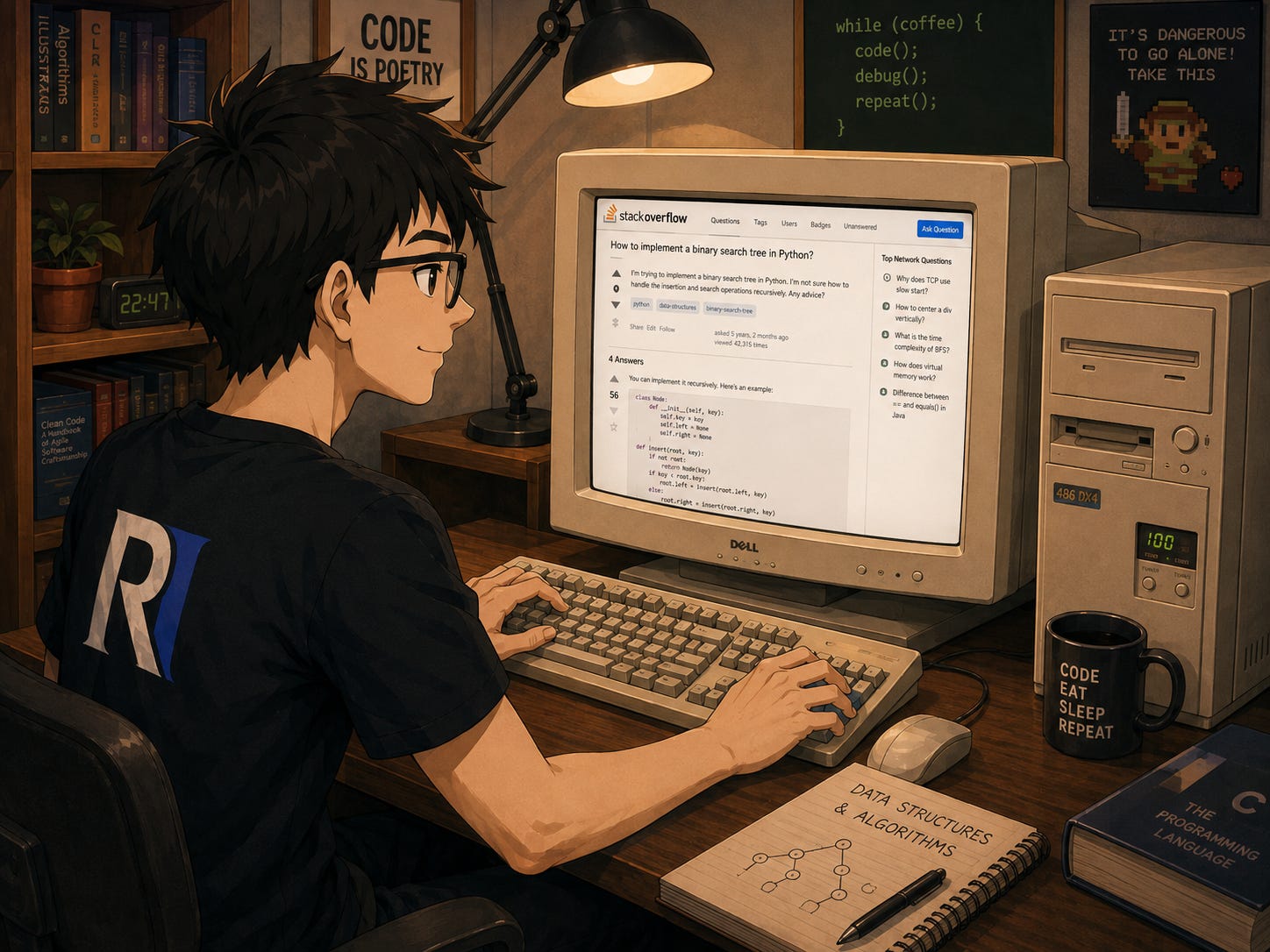
I remember what building software used to require before any of this existed. You hit a wall, you opened fifteen browser tabs, you read through a Stack Overflow thread from 2011 where half the answers contradicted each other, and you pieced together something workable from the fragments that seemed trustworthy. That part is genuinely gone, and I don’t miss it. You don’t have to Google much anymore. You can ask the question directly and get an answer in seconds instead of forty minutes of digging and you’re hoping that it’s sourcing from the good stuff.
Here’s what people get wrong about that change. They think it means the digging itself is gone. It isn’t. It moved. It used to live in the search, figuring out which of fifteen tabs actually applied to your situation. Now it lives in the verification, figuring out whether the answer you got in three seconds is actually correct for your situation. The work didn’t disappear. It relocated from finding information to checking it.
This is exactly why asking the right question matters more than it used to, not less. And that’s where experience matters even more, not less. A vague search used to get you a pile of mediocre results you had to sort through yourself, which was annoying but forgiving, because you were forced to compare sources before you trusted any of them. A vague prompt gets you one confident, fluent, single answer with nothing to compare it against, which feels like a better experience and is actually more dangerous, because there’s no second source sitting next to it disagreeing with it and making you think twice. You have to manufacture that skepticism yourself now. Nobody hands it to you for free anymore.
So when something actually matters, when it’s a security decision, a payment flow, a piece of data you can’t afford to get wrong, the due diligence doesn’t go away just because the AI answered fast and sounded sure. You still need to open the actual documentation. Yeah, I said it. You still need to read the source the AI is summarizing instead of trusting the summary. In fact, you should read its thoughts as it writes them just so you understand the approach it’s taking.
You still ask it to show you where it got that answer, and you still check. The beauty of this whole shift isn’t that you get to skip the diligence. It’s that you get to skip the part that used to eat all your time, so the diligence you do have time for goes toward the questions that actually deserve it and the actual engineering that comes out of it.
Graduating

I tend to call myself an agentic developer now, not because I stopped using AI to build BenchBoard, but because of what changed in how I use it. I still let it write the bulk of the code. I still move faster with it than I ever could alone. The difference is that I don’t accept an explanation just because it’s confident, and I don’t assume a working demo means a working system, and when something under the hood doesn’t make sense to me, I stop and ask until it does, even when the app is already running fine in front of me.
The habit of making good decisions and asking solid questions instead of moving past your code session in a vibey way gets you closer and closer to the ceremony. Don’t skimp on being diligent and detailed because the site loaded and nothing crashed.
Vibe coding got you a working app. Asking good questions is what gets you an app you actually understand.
And hopefully, three months from now, when something under the hood that used to work fine starts acting up for strange reasons, you have the starting point to build something. An idea that used to appear out of reach — that now seems possible today.
So, go out there and build it.
Glossary — for all you ambitious newbies ;)
A few terms from this piece, for anyone who wants the plain-language version in one place instead of hunting back through the paragraphs.
Modal: the pause menu of your app. The main screen freezes behind it while you deal with one specific task, then you close it and the game resumes right where you left it.
Commit: a save point. A snapshot of exactly where things stood, that you can always load back up later if things go sideways.
Version control (usually a tool called Git): your full save-file history, not just the most recent save. Every checkpoint gets kept, in order, so you can go back to any one of them, not only the last one you made.
Database: the equipment room. The permanent storage where everything lives whether or not anyone’s out on the field right now, so it’s all still there the next time someone shows up and opens the door.
JSON blob: dumping the entire gear bag into one box. Everything’s technically in there somewhere, but nothing has its own labeled shelf, so finding or trusting any one piece means digging through the whole pile.
Table, row, column: a lineup card. The card is the table. Each player gets one row. Each column is a stat or slot every player has a spot for, like position or batting order, whether or not that player actually has anything to put there.
Guid: a player’s own permanent jersey number, except no two players anywhere, on any team, in any league, could ever accidentally share one. Nobody gets confused for anybody else.
Trigger: an automatic whistle. Something built to fire on its own the instant a specific condition happens on the field, with no referee actually there to blow it by hand.
SignalR: the live broadcast feed. Everyone watching sees the play the moment it happens, instead of everyone having to refresh their own scoreboard app to find out what they missed.
Agentic developer: see the note above for where the term actually comes from.
And if you’re really curious and want to understand more, ask your favorite model to give you the answers. It’s good at this part.
I've always thought agentic made more sense than vibe, thanks for that. Coming from the eliminative theory of mind with Immanuel Kant's deontology. I'm only a lucky amateur wandering within this, from the 2023 backlash. It's nice to see various fields exploring this interdisciplinarity.
It's going to take a lot of work with understanding, foundherently, all the parts that are going to change with a new structural framework forming in this coming era. With no concrete singuler point, to another picture.
Here are more notes for you to ponder.
https://seths.blog/2025/04/technical-debt-and-ai-slop/
https://www.seangoedecke.com/in-defense-of-not-understanding-your-codebase/