



This is Part 2 of a five-part series about building BenchBoard — a team management and live scorekeeping app for youth baseball and softball — with the help of AI tools. If you missed Part 1, start there. It sets the stage for everything that follows.
In Part 1, I mentioned that the AI once built a race condition directly into my live scorekeeping system. I said I’d tell you the full story. So here it is.
But first, a little context — because this story doesn’t make sense unless you understand what BenchBoard is actually doing under the hood.
What a “Simple” Lineup Actually Looks Like in Code
When most people hear “lineup management,” they picture a list. A list of players, nine positions, maybe a batting order. How hard could it be?
Here’s how hard.
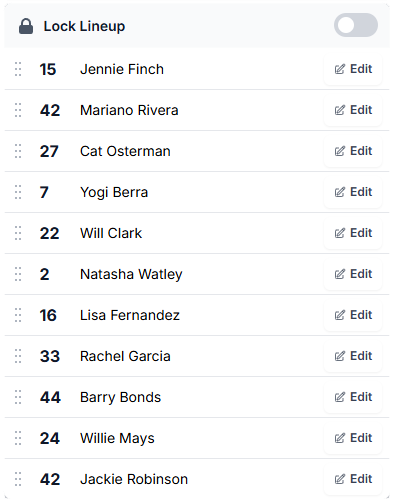
A lineup in BenchBoard isn’t a list. It’s a snapshot — a single atomic record that holds three separate JSON blobs at the same time: who’s active on the roster (ManagePlayersJson), what order they’re batting in (BattingOrderJson), and where they’re positioned on the field (DefenseJson).
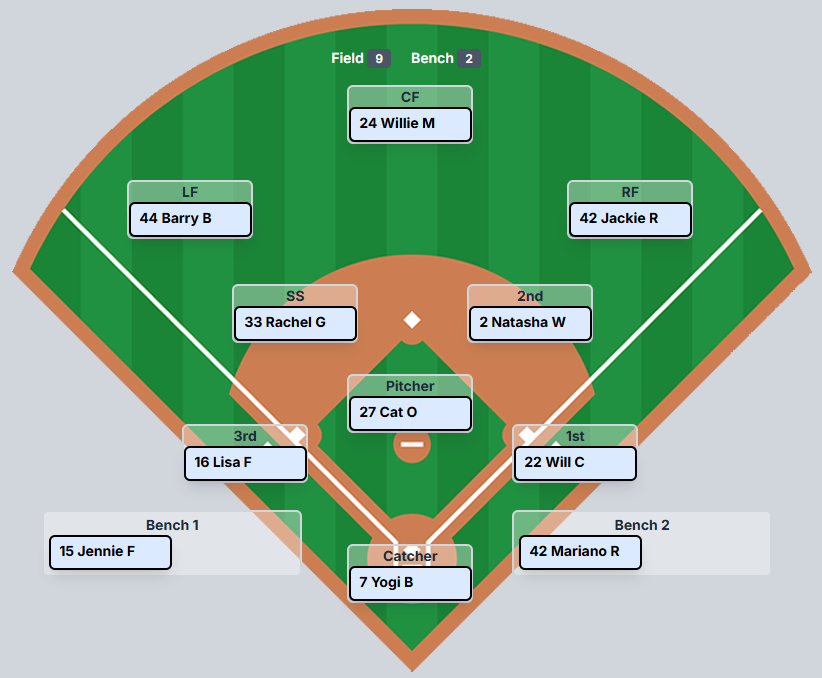
All three of those blobs interact with each other.
Here’s what a single LineupSnapshot actually looks like in the database. One row. Three blobs. Everything about your team’s current state lives here:
LineupSnapshot (one row per team per game)
├── TeamId: "a]4f2e..."
├── GameId: "7dee-4c9d..." (null = practice mode)
│
├── ManagePlayersJson:
│   [
│     { "playerId": "p-001", "name": "Barry Bonds",     "jersey": 25, "active": true  },
│     { "playerId": "p-002", "name": "Jennie Finch",    "jersey": 27, "active": true  },
│     { "playerId": "p-003", "name": "Jackie Robinson", "jersey": 42, "active": true  },
│     { "playerId": "p-004", "name": "Yogi Berra",      "jersey": 8,  "active": true  },
│     { "playerId": "p-005", "name": "Monica Abbott",   "jersey": 14, "active": false },
│     ...12 players total
│   ]
│
├── BattingOrderJson:
│   [
│     { "playerId": "p-003", "order": 1 },   // Jackie Robinson leads off
│     { "playerId": "p-001", "order": 2 },   // Barry Bonds bats second
│     { "playerId": "p-002", "order": 3 },   // Jennie Finch bats third
│     { "playerId": "p-004", "order": 4 },   // Yogi Berra cleanup
│     ...only active players, sequential, no gaps
│   ]
│
├── DefenseJson:
│   {
│     "p-001": 9,    // Barry Bonds → Left Field
│     "p-002": 3,    // Jennie Finch → Pitcher
│     "p-003": 8,    // Jackie Robinson → Shortstop
│     "p-004": 11,   // Yogi Berra → Right Field
│     "p-005": 1,    // Monica Abbott → Bench Slot 1 (inactive)
│     ...
│   }
│   // Position IDs: 1=Bench1, 2=Bench2, 3=Pitcher, 4=Catcher,
│   // 5=1st, 6=2nd, 7=3rd, 8=SS, 9=LF, 10=CF, 11=RF
│
└── LockLineupToggle: false
See how they connect? If you deactivate Monica Abbott in ManagePlayersJson (active: false), that has to cascade into BattingOrderJson — she gets removed and the order renumbers so there’s no gap at position 5. And it has to cascade into DefenseJson, because if she was at pitcher, you can’t leave an empty circle on the mound. Everything ripples.
That’s the resting state. Now make it live. A coach is standing on a field with their phone, moving players around mid-game. A parent in the stands is watching a live scoreboard on their phone. The scorekeeper is tracking pitches in real time. All of these views need to stay in sync, instantly, and they all read from the same underlying data.
This is the kind of complexity that sounds manageable when you describe it in a sentence but becomes a monster the moment you start writing the code. And it’s the kind of complexity that LLMs are terrible at anticipating — because they’ve never stood on a field and watched a coach frantically swap their right fielder for a kid who just showed up late.
Three Tables Walk Into a Bar

Let me tell you how this mess started, because it’s a perfect example of how AI-generated prototypes can set you up for pain down the road.
Back in July, when I was still on ChatGPT, I was using Codex to build out the early screens — the roster view, the lineup card, the field diagram. Basic prototypes. The kind of thing where you describe what you want and the AI generates a working UI in minutes. And it was impressive. I had screens that looked real within hours.
But here’s what Codex also did: it looked at those prototypes and decided what the database should look like. It saw a roster screen, a batting order screen, and a field position screen — three screens — and created three tables. One for managing which players were active (LineupEntries). One for the batting order. One for the defensive positions (DefensiveAssignments). It even told me the schema was “expandable and would work perfectly over time.” Real words from the LLM. Not mine.
From a database design perspective, it wasn’t a bad answer. It’s what you’d find in a textbook. Each concern is separated. Each table has a clear purpose. If you were building a homework assignment, you’d get an A.
But I wasn’t building a homework assignment. I was building an app where a coach is standing on a field in 95-degree heat, trying to swap two players before the umpire yells “Play ball.” And in that world, three tables is a disaster.
Every time a coach made a change — moving a player from the bench to the field, or swapping two players in the batting order — the system had to coordinate writes across three tables. If one write succeeded and another failed (network hiccup, timeout, race condition), you’d get an inconsistent state. The batting order says the player is #6, but the manage-players table says they’re inactive. The field shows them at shortstop, but the batting lineup doesn’t have them at all.
The number of database migrations I’ve had since those original three tables is insane. At one point I had 36 migration files just for DefensiveAssignments alone — adding slot constraints, bench slots, indexes, field position constraints. Every time I discovered a new edge case, it was another migration. Another schema change. Another deployment risk.
This is the kind of thing the AI never warned me about. It looked at three screens and gave me three tables. It didn’t think about what happens when all three need to change atomically in the same instant.
And before someone in the comments says “well, you should’ve used MongoDB” or “NoSQL would’ve solved this” — no. Hard no. I need transactions. I need relational integrity. I need to know that when a coach confirms a lineup, that data is exactly what the system says it is. I need hard receipts. A scorekeeping app isn’t a dashboard pulling from a million data stores — it’s a system of record. Every pitch, every substitution, every lineup change needs to be verifiable and consistent. I love MongoDB — it’s a great database for the right use case. This isn’t it. Document-based storage would’ve given me the same data consistency nightmares, just wrapped in a different syntax. And honestly, it probably would’ve been messier, because at least with SQL Server I get real foreign keys and real transaction isolation.
Eventually, I made the call to consolidate all three tables into a single LineupSnapshot — one atomic record that holds everything. When the coach makes a change, one record gets written. If it fails, it fails completely. If it succeeds, everything is consistent. The refactor touched dozens of files across both the backend and frontend, required migrating all existing data, and took days. But when it was done, an entire category of bugs just disappeared.
The AI didn’t suggest this refactor.
I did.
Because I’d been living with the bugs its original “expandable” schema created for months.
The Night I Found Two Players at Right Field

A few weeks later, I’m testing BenchBoard late at night. I’m dragging players around the field — moving Jackie Robinson to right field, where Yogi Berra is already stationed. Standard swap. The app should move Jackie to RF and send Yogi somewhere else — back to his original position or to the bench.
I do the drag. It looks fine. I switch to a different game to check something. I switch back.
Two players at right field. Jackie and Yogi, both sitting in the same position. That’s not supposed to be possible.
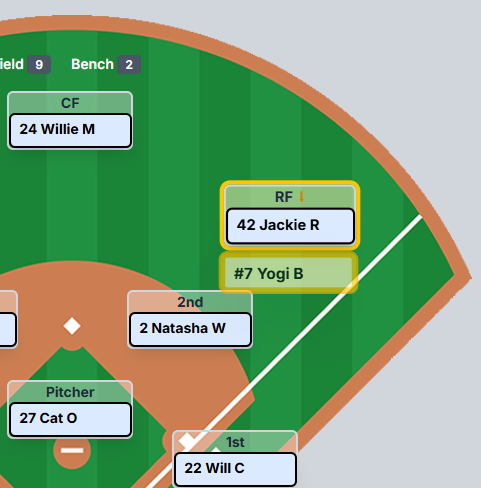
I check the console logs. The data is there — the system knows there are two players at RF. But somehow the snapshot saved with both of them at the same position. The deduplication logic on the backend catches it after the fact, but the damage is already done. The data is dirty.
So I start tracing the flow with the AI, and here’s what we find.
When a coach drags a player to a new defensive position, the system does four things:
Optimistic update — the frontend store immediately swaps the players so the UI feels instant.
syncSnapshot fires — the frontend serializes the entire store and writes the lineup snapshot to the database. Writer #1.
The defensive controller fires — a separate API call tells the backend to process the swap with its own logic and write the result to the same snapshot. Writer #2.
Re-fetch — the frontend pulls the latest snapshot from the backend and rehydrates the store from whatever it finds.
See the problem?
Steps 2 and 3 are both writing to the same database record at the same time. It’s a textbook race condition. Here’s what it looks like with real data:
BEFORE THE DRAG:
  DefenseJson: { "p-003": 8, "p-004": 11, ... }
               // Jackie → SS,  Yogi → RF

COACH DRAGS JACKIE TO RIGHT FIELD:

  Step 1 - Frontend optimistic update:
    { "p-003": 11, "p-004": 1, ... }
    // Jackie → RF, Yogi → Bench1 ✓ (looks right)

  Step 2 - syncSnapshot writes to DB:          ← Writer #1
    saves { "p-003": 11, "p-004": 1, ... }
    // Jackie → RF, Yogi → Bench1

  Step 3 - Defensive controller writes to DB:  ← Writer #2
    saves { "p-003": 11, "p-004": 8, ... }
    // Jackie → RF, Yogi → SS (his original spot) ← CORRECT

  WHO WINS? Whichever HTTP response finishes LAST.

  If Step 2 finishes after Step 3:
    DB has: { "p-003": 11, "p-004": 1, ... }
    // Yogi is on Bench1 instead of back at SS
    // The controller's correct swap got silently overwritten
Whichever HTTP response finishes last wins. If syncSnapshot finishes after the defensive controller, it overwrites the controller’s properly-computed swap with the frontend’s optimistic state — which has Yogi bumped to bench slot 1 instead of back to his original position. The backend controller’s correct answer gets silently erased.
The AI identified the race condition once I pointed out the symptoms. It then proposed what it called “the clear answer”: just stop calling syncSnapshot from the defensive drag handlers. Let the defensive controller be the sole writer.
That’s a band-aid. It would’ve fixed this particular race condition. But it wouldn’t fix the architectural flaw underneath — which is that there were multiple independent writers competing for the same data, with no coordination between them.

“No. I Have a Better Architecture.”
That was my exact response to the AI. And what followed was one of the most interesting dynamics of this entire build.
I didn’t just disagree with the AI’s fix. I redesigned the whole pipeline.
Here’s what I told it:
syncSnapshot becomes the parent — the single orchestrator for all lineup changes. Every action — whether it’s a roster toggle, a batting order drag, or a defensive position swap — flows through syncSnapshot as a pipeline with three stages:
Coach action (drag / toggle / activate)
  │
  ▼
syncSnapshot — the single orchestrator
  │
  ├─► MPCon (ManagePlayersController)
  │     Runs FIRST. Diffs the roster.
  │     "Monica Abbott just got deactivated."
  │
  ├─► BLCon (BattingLineupController)
  │     Runs SECOND. Reads MPCon's output.
  │     "Monica was batting 5th — close the gap,
  │      renumber 6→5, 7→6, 8→7..."
  │
  └─► DLCon (DefensiveLineupController)
        Runs LAST. Reads MPCon's output.
        "Monica was at Pitcher — she's inactive now,
         move the sub in. Only I write DefenseJson.
         No one else. Ever."
  │
  ▼
Write once → localStorage → SignalR push to DB
  │
  ▼
RenderMainBoard — rehydrate UI from the updated store
Stage 1: ManagePlayersController runs first. It checks what’s changed in the roster — who got activated, who got deactivated. It establishes the ground truth of who’s even available.
Stage 2: BattingLineupController runs next. It reads the roster state from Stage 1, looks at the batting order (which may have been reordered via drag-and-drop), and renumbers to fill any gaps. If a player was deactivated in Stage 1, the batting order closes the hole automatically.
Stage 3: DefensiveLineupController runs last. It reads the roster state from Stage 1, processes any defensive position changes, enforces the rules (one player per field position, swap logic), and builds the final DefenseJson. No other handler anywhere in the system is allowed to write DefenseJson. This is the single source of truth.
After all three stages complete, the system writes everything to localStorage, pushes to the database via SignalR, and rehydrates the UI.
One pipeline. One write path. No races.
The AI’s response?
“Good architecture.”
Then it asked me six clarifying questions — smart ones — about trigger timing, swap logic ownership, whether the old API endpoint should be replaced entirely, how the rendering layer should consume the results, and whether practice mode follows the same path.
I answered all six. The AI then produced a perfect diagram of the architecture, confirmed its understanding, and started implementing.
That’s the dynamic. The AI is an incredible implementer. It can take a well-defined architecture and execute it flawlessly across a dozen files in a fraction of the time it would take me. But it didn’t — and couldn’t — design that architecture. Not because it’s stupid. Because it doesn’t have the context. It doesn’t know that coaches switch between games constantly on their phones. It doesn’t know that a guest player might show up wearing the same jersey number as your starting pitcher. It doesn’t know that eventually I want parents watching a live scoreboard on a TV at the concession stand.
I know those things because I’m the coach. I’m the parent. I’m the guy who’s been at the field.
Why the Band-Aid Would’ve Come Back to Bite Me
Let me explain why the AI’s original fix — “just don’t call syncSnapshot from MainField” — would have failed down the road.
Under that approach, defensive changes would go through one code path, and batting/roster changes would go through another. Two separate write paths, two separate sets of assumptions, no guarantees about ordering or consistency.
Now imagine this: a coach deactivates a player from the roster (manage-players path) at the exact moment the scorekeeper swaps a defensive position (defensive path). Under the band-aid fix, those are two independent operations hitting the same snapshot with no awareness of each other. The deactivation writes ManagePlayersJson, and then the defensive swap writes DefenseJson — but DefenseJson still has the deactivated player at shortstop because the defensive controller didn’t know about the roster change.
With the unified pipeline, that can’t happen. The roster change flows through MPCon first, then BLCon, then DLCon — and DLCon already knows the player is inactive before it processes the defensive state.
This is what I mean when I say the AI can’t architect your system. It can identify a bug. It can propose a fix. But it can’t see the second-order consequences of that fix six months from now when your user base has tripled and coaches are making changes during live games while their phone signal drops in and out.
That requires judgment. That requires experience. That requires having been in the mess yourself.
The Uncomfortable Truth About “Vibe Coding”

There’s a trend right now — people calling it “vibe coding” — where you just keep prompting the AI until something works. No architecture. No planning. No understanding of what the code is actually doing. Just vibes. And you can thank Andrej Karpathy for that one. The irony is that he’s actually a damn good coder. But that’s what happens when your post about “coding with vibes” goes viral.
Look, I get the appeal.
It feels fast. And for a demo, a prototype, or a personal project that only you’ll ever use, maybe that’s fine.
But for anything real — anything that other people will depend on, anything that handles live data, anything that needs to work when the network drops or two users hit the same button at the same time — vibe coding is a time bomb.
The race condition I just described? That’s a vibe coding bug. Everything looks fine. The UI updates. The data saves. It only breaks when the timing is just wrong enough that two writes collide. You’d never catch it in a demo. You’d only catch it when a real coach, on a real field, switches games at exactly the wrong moment and sees two players at right field.
If you don’t understand what a race condition is — if you’ve never been taught about concurrent writes, atomic operations, or state management — you’ll never know why your app “randomly” loses data. You’ll blame the framework. You’ll blame the hosting provider. You’ll keep prompting the AI to “fix the bug” and it’ll keep applying band-aids to symptoms instead of addressing the architecture.
And I say this as someone who loves these AI tools and uses them every single day. They are genuinely incredible. But they’re tools. And a tool in the hands of someone who doesn’t understand the work is just a more efficient way to create problems.
The Wrong Team on the Wrong Screen
The race condition wasn’t the only invisible bug the AI created. Here’s one that was arguably scarier — because it was a data integrity issue that affected which user’s data showed up.
One night I’m testing multi-user flows. I log in as one test account — let’s call him Baker Mayfield, UserID 7. His team should load. His players. His roster. Instead, I’m looking at 28 players that belong to a completely different account — UserID 3, a dev test account I’d been using earlier.
I check localStorage. Sure enough, the stored team ID doesn’t match the logged-in user. The AI had set up localStorage with generic keys — just a flat teamId and settings — with no namespacing per user. So when I logged in as a different user in the same browser, the old user’s data was still sitting there. The app saw a valid team ID in storage, loaded it, and never questioned whether it belonged to the person actually logged in.
This is the kind of bug that works as long as you only ever test with one account. The moment a second user touches the same browser — or you’re a developer switching between test accounts, which you do fifty times a day — everything looks fine but the data is wrong.
I told the AI: there should be exactly three keys in localStorage, and they need to be scoped per team and per user:
team_[TeamID]_user_[UserID]_bbentities   (TTUUB)
team_[TeamID]_user_[UserID]_settings     (TTUS)
currentUser_[UserID]                     (CUID)
That’s it. They sit side by side, each one namespaced to its owner. When a different user logs in, their keys are separate. No cross-contamination. No loading Baker Mayfield’s screen with someone else’s roster.
The AI didn’t design this namespacing. It built a flat storage scheme that worked for one user and silently broke for two. I caught it because I was actually testing the app the way real people would use it — switching accounts, sharing a device, logging out and back in. The AI never simulated that.
Same Browser, Two Environments, One Nightmare
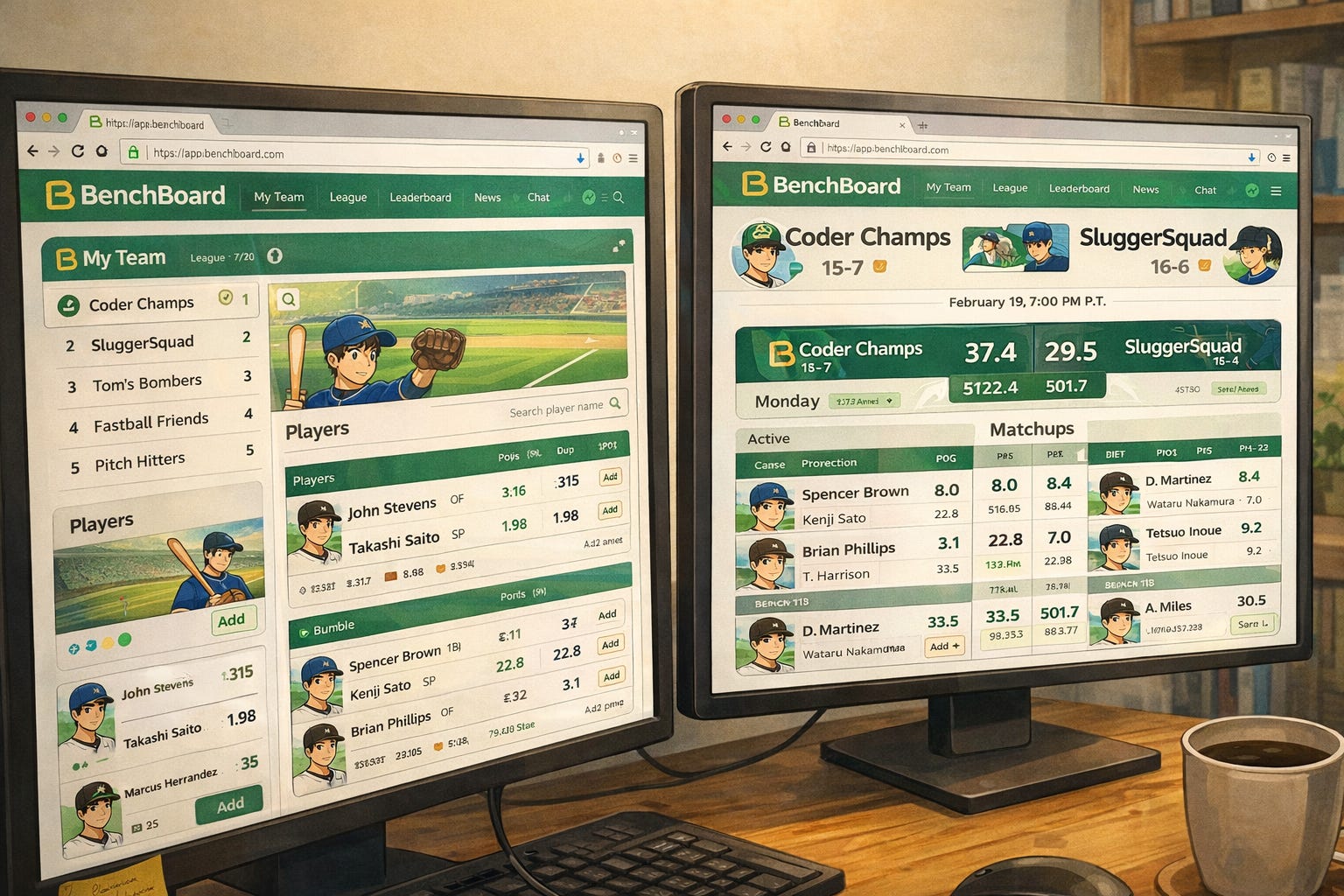
While we’re talking about invisible bugs: here’s a lesson that cost me an entire evening and has nothing to do with code quality.
If you’re running a containerized development environment and a production environment — do NOT use the same browser for both. And definitely don’t use the same email addresses.
I was testing on localhost:5173 (local dev) and api.benchboard.org (production). Same browser. Same test email. Both environments issue JWT tokens. And JWT tokens live in the browser.
So what happens? I visit production, get a valid production token. Switch to localhost, the token is still there. The local frontend sees a “valid” token and lets me in — but the token is for the wrong environment. Everything looks logged in. Some API calls work because the token hasn’t expired yet. Others silently fail with 404s instead of 401s because the production endpoints have changed.
I spent an evening debugging what looked like a broken API. It wasn’t broken. I was authenticated against the wrong server with a stale token from a different environment.
The fix is stupidly simple: use Chrome for dev, Firefox for production. Or use separate browser profiles. The AI will never tell you this because it’s not a code problem — it’s an operational problem. It’s the kind of thing you only learn by doing it wrong at 11 PM on a Tuesday.
When You Know Exactly Where to Point the AI
I’ve been hard on the AI in this article, so let me show you the flip side — a moment where knowing my own codebase turned the AI into a surgical instrument.
I had a layout bug in the scoreboard. In demo mode, the inning scores, the R/H/E table, the ball-strike-out count, and the base diamond were all shifted to the right — overlapping, overflowing, completely broken. But when I logged in as a real user, everything rendered perfectly.
Now, if I didn’t know what I was looking at, I’d prompt the AI with something vague like “the scoreboard looks broken in demo mode, fix it.” And the AI would start guessing. It might rewrite the whole grid. It might restructure the component. It might introduce five new bugs while fixing one.
Instead, here’s what I did. I opened the browser’s inspect element. I found the CSS class on the broken section: rounded-tl-md rounded-bl-md overflow-hidden. I searched my codebase for that class to identify the exact file and line number. I noticed that the code was well-commented — each section marked with === Inning Score Table ===, === R / H / E Table ===, === B / S / O Count ===. Then I gave the AI this prompt:
“Can you take a look into ‘DEMO MODE’ under Scoreboard-v4-desktop.jsx? Just under that mode, the Inning Score Table, R / H / E Table, B / S / O Count and Base Diamond are all over the place. But when I’m logged on it displays fine. Start here @Scoreboard-v4-desktop.jsx#L101-106 and make your way to the rest of the code and tell me what you’ve found @Scoreboard-v4-desktop.jsx#L108-341”
Specific file. Specific line numbers. Specific symptom. Specific scope.
The AI came back in seconds with the exact root cause: a <Show> block was rendering an empty <div /> inside a CSS grid container. In demo mode, that empty div occupied a grid column slot, pushing every table one column to the right. In logged-in mode, the same block rendered an absolutely-positioned overlay that didn’t participate in grid flow — so the layout was fine.
The fix? One line:
BEFORE: <div />
AFTER:  <div class="absolute" />
That’s it. One CSS class. The entire scoreboard snapped back into place.
The lesson isn’t that the AI is smart — it is, but so is a chainsaw. The lesson is that when you know your codebase well enough to point the AI at the right ten lines instead of the whole file, it becomes terrifyingly efficient. The people who are “vibe coding” — just throwing the whole problem at the AI and hoping — they’d never get this result. They’d get a rewrite of the entire component that introduces three new bugs.
You have to know where to aim.
Where AI Shined in This Story

I want to be fair here, because the AI absolutely earned its keep in this refactor.
Once I defined the architecture — the pipeline, the stages, the write paths — the AI implemented it across the entire codebase in a fraction of the time it would have taken me alone. It traced every file that needed to change. It found every broadcast location that needed retargeting. It updated the backend controllers, the frontend store, the SignalR client, and the UI components in a coordinated sweep. Then it committed the changes with a detailed message that documented exactly what changed and why.
That’s what I mean by “accelerator.” The thinking was mine. The execution was a partnership. And the result was better than either of us could’ve produced alone — me because it would’ve taken me days to touch that many files manually, and the AI because it never would’ve designed the pipeline in the first place.
Next up — Part 3: “The Feedback That Changed Everything.” I’ll tell you about the moment real coaches — people who found BenchBoard through search and started using it without being asked — told me the truth: “It’s a nice toy, but it needs data.” That feedback meant I had to build an entire live scorekeeping engine on top of what I already had. Essentially a second app. And the decision to do it terrified me.
If you're following this series and it's resonating — subscribe. Part 3 is the turning point where BenchBoard stopped being a side project and became something real.